SOFTWARE SUPPORT / NODE-RED
Create your second flow
Validate a reading, convert its unit and route the result to the correct branch.
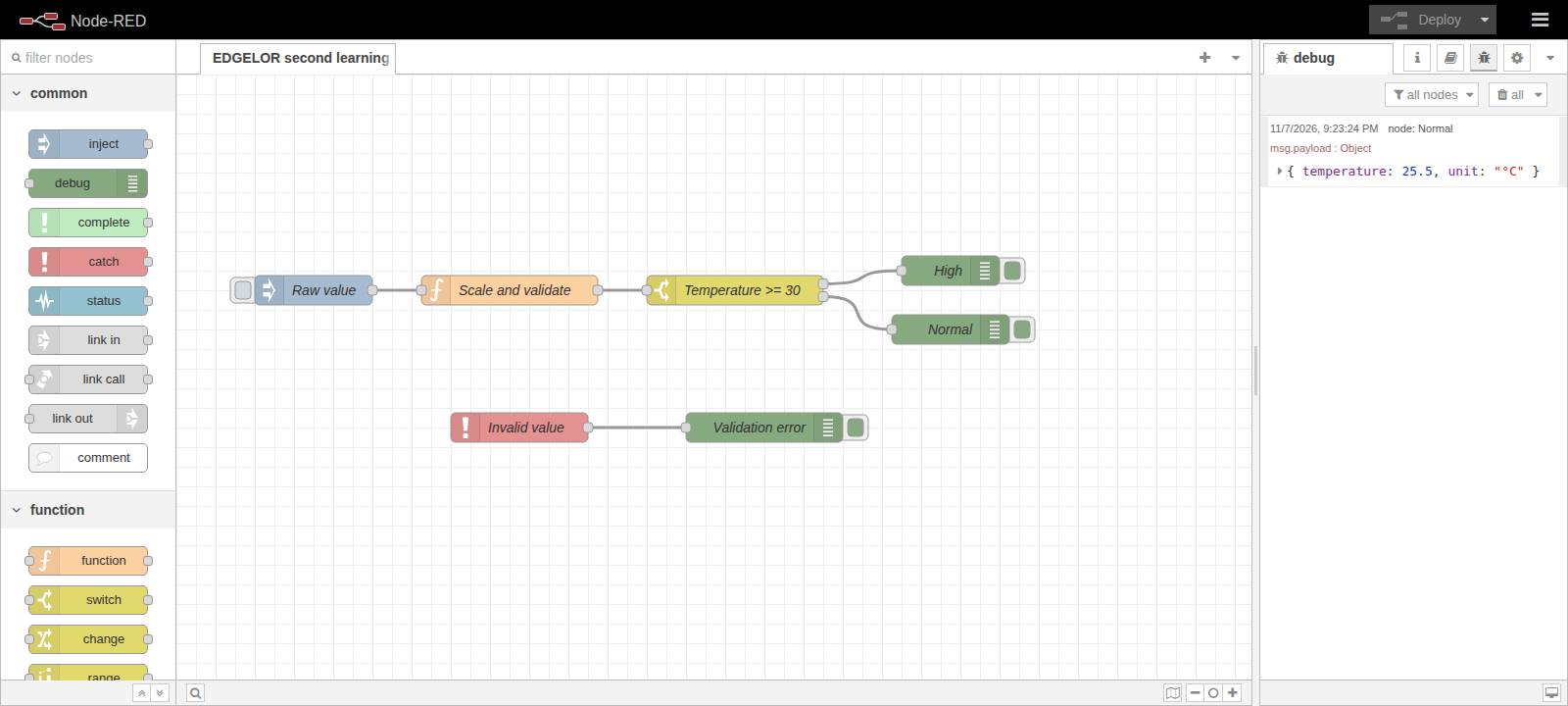 Enlarge diagram +
Validate and scale
Convert the numeric input, reject blank or non-finite values, then set temperature to raw / 10 and unit to °C.
Choose the branch
Configure Switch to test msg.payload.temperature: greater than or equal to the number 30, then otherwise.
Observe both outcomes
Connect the outputs to named High and Normal Debug nodes. Deploy and test 255, then 305.
Test invalid input
Try the string invalid. Expect the Function node to report an error to Catch and emit no normal or high result.
const raw = Number(msg.payload);
if (String(msg.payload).trim() === "" || !Number.isFinite(raw)) {
  node.error("Invalid raw value", msg);
  return null;
}
msg.payload = { temperature: raw / 10, unit: "°C" };
return msg;Try the message logic
Browser-only learning example. It does not run a gateway or control field equipment.
Enter a finite number. No output message was emitted.